On-Site Assessments, Review Requests, AI Upgrades & More
Requests and on-site assessments are here, getting more 5-star reviews just got a lot easier and Rotor’s MCP can now do a lot more for you. Here are a few highlights since our last update!
Requests & On-Site Assessments
Requests give you one place to log incoming work, book an on-site assessment, and turn it into a quote, job or service plan.
Find them: on web, go to Service → Requests. On mobile, use the + menu or the Requests section on lead and customer pages.
On-site assessments: book one with anyone on your team (technicians, salespeople or office), even outside their usual hours. Assessments show on Schedule and Home, and on web you can drag them to reschedule.
Web forms: a form can now create a request, with the answers added to its notes. In the form's settings, set This form creates → New Request.
Client messaging: assessment booked, reminders, On My Way, and a new Assessment Completed text (off by default). Set them up at Settings → Messaging → Requests & Assessments.


Requests is on for every company, on web and in the latest mobile app update. Admins can turn it off under Features.
Learn more about Requests:
https://helpcenter.getrotor.com/en/articles/7459269-requests-and-on-site-assessments
Review Requests
Rotor can now ask your customers for a review by text and email, collect their star rating on a page with your branding, and send happy customers on to your public review site (like Google). Lower ratings stay private so you can follow up before they turn into a bad public review.

How it works:
Automatic: send a request after a job is completed or an invoice is paid, with a delay you choose. Requests wait for your business hours.
Manual: press Request Review on a job (web or mobile) or from a customer's Activity tab
Workflows: add a new Send review request step to any workflow
Reminders: a follow-up goes out if the customer hasn't rated yet (3 days by default)
You choose the star rating that gets the public link (4 stars and up by default), and how long to wait before asking the same customer again.
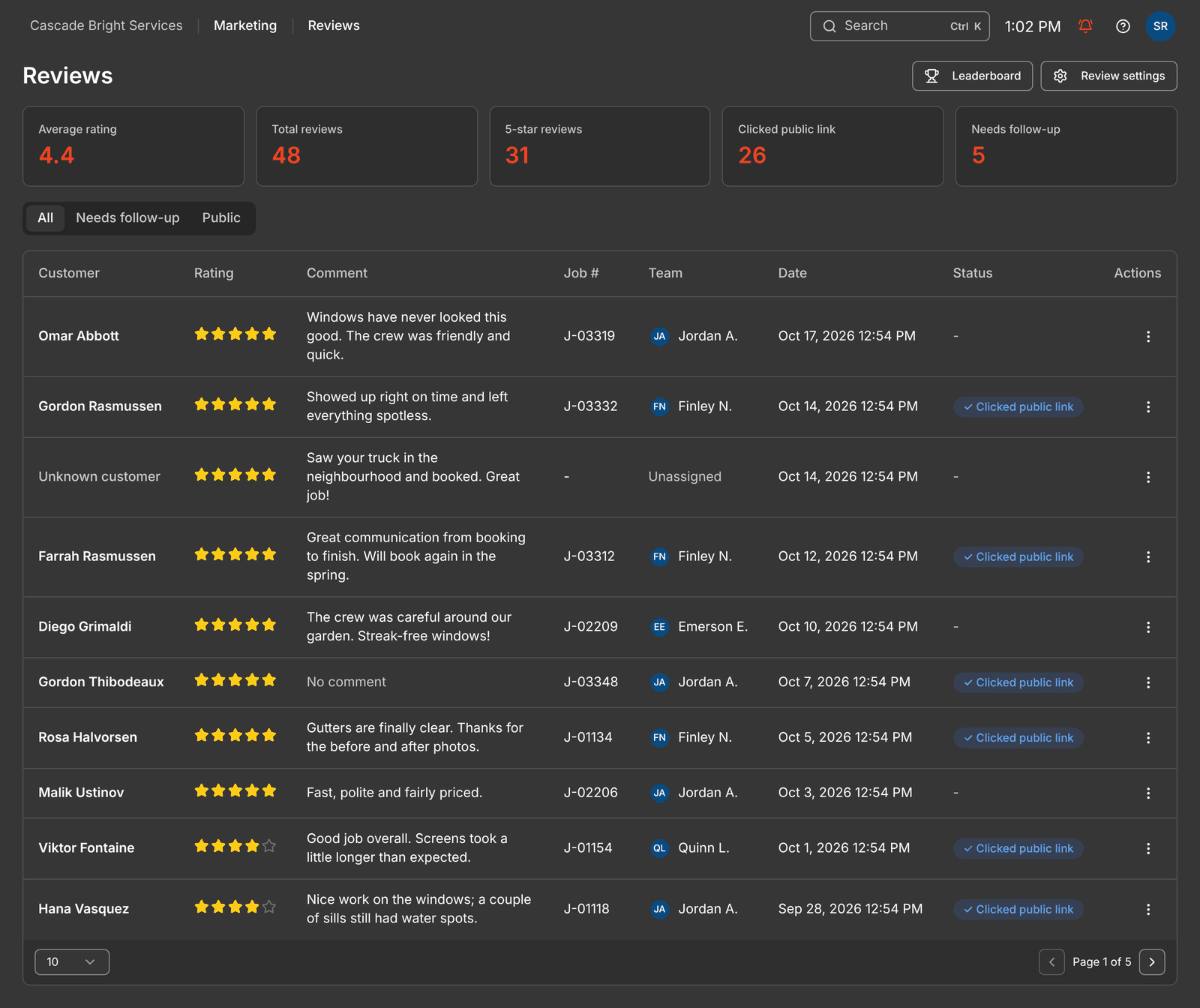
Track it all on the new Reviews page under Marketing:
Average rating, total reviews, 5-star reviews and reviews that need follow-up
Mark follow-ups as resolved
A Leaderboard that credits the technicians on each job, so you can see who's earning the best reviews

You also get a shareable review page link for business cards, stickers and email signatures.
Get started: go to Settings → Messaging → Reviews.
Learn more about Review Requests:
https://helpcenter.getrotor.com/en/articles/5271457-review-requests
Client Documents & Company Terms
Control how your PDFs look, what's on them, and the terms your customers see, all at the bottom of Settings → Business:
Pick a layout: Band, Classic or Compact
Choose your header details: show or hide your address, phone, email, website and tax number
Set what shows on each document: separate settings for quotes, jobs, invoices and receipts, including line item descriptions and photos, quantity, unit price, tax breakdown, client notes, a link to your terms and a footer message
Company terms: add your terms once and they'll show on quotes in the client portal and on the quote PDF, with a public link customers can open anytime. No signed agreement needed. More places are coming soon.
Job PDFs: download a PDF of any job from the ⋯ menu on the job page, handy for sending a customer a simple confirmation
Agreement template terms & conditions are still separate, and now have a rich text editor so you can format headings, lists and bold text.


Rotor MCP Can Do More
Connect Rotor to Claude, Chat GPT or Grok and you can now ask it to:
Send things: reply to texts and emails in your inbox, and send quotes, invoices and service plan agreements
Jobs and scheduling: create one-time jobs, edit line items, add or reschedule visits, schedule a service plan's pending jobs, and (admins) manage crew assignments, availability and time off
Sales: create, edit and convert quotes, create invoices, create and activate service plans, move people through pipelines, and convert leads to customers
Campaigns (admins only): Rotor AI shows you a preview and waits for your OK before anything sends
Learn more about Rotor MCP:
https://helpcenter.getrotor.com/en/articles/7180081-rotor-mcp
Option Quoting Improvements
The upgrades from our last “Coming Soon” list are live:
No option pre-selected: the portal won't pick an option for your customer unless you've marked one as recommended
Photos per option: add photos to the option itself, separate from line item photos
Notes per option: each option can have its own notes
Advance to agreement per option: choose which options advance to an agreement
Better mobile preview: an improved “View quote as Client” screen in the mobile app

Option Quoting is now turned on for Pro plan accounts. Don't see it? Reach out through in-app support.
Learn more about Option Quoting:
https://helpcenter.getrotor.com/en/articles/0112612-option-quoting
Things Moved
Engagement is now called Marketing, and its tabs have been reordered
Web Forms and Booking Forms now live under Marketing
Agreement Templates moved to Settings → Service Plans
Our help center articles have been updated to match.
Fixes & Polish
Android calling: you can now make and receive calls in the Android app, and the app no longer crashes during calls
Visit reschedules: reminders now send after a visit is rescheduled
Schedule: the week of Nov 1 (when daylight saving time ends) no longer shows two Sundays, the map now includes the last day of the pending jobs range, and job details no longer open off-screen near the bottom of the page
Mobile pending jobs: cycle-billed jobs no longer show $0
Templates stay in sync: edit a message template and every workflow using it updates. Need a one-off version? Click Customize from template.
Client portal: customers with non-US phone numbers can log in, and portal payment errors are fixed
Tap to Pay: reconnects properly if your Stripe location changed
Manual payments: invoices with $0 tax are no longer left “Partially paid”
Checklists: photos no longer get dropped
Coming Soon!
Payroll Overhaul: a rebuilt payroll experience
Service plan renewals: more control over how and when plans renew
Referral Program: track referrals and reward customers with credits (sneak peek in the Marketing tab)
Review the Latest Updates
Log in to Rotor and review these updates and articles with your team. Reach out to us directly via our in-app support with any questions and we are happy to coordinate.
Keep in touch!
If you’re curious about Rotor or would like to learn more, we’d love to meet you! We feel super blessed to work alongside such a great industry and love helping our companies succeed.
👉 BOOK TIME WITH US: https://calendly.com/carson-getrotor/rotor-demo
Follow the journey on Instagram @get_rotor
Have feedback on any of these? We want to hear it. Reach out through the Discord community, the in-app chat, or email us at support@getrotor.com.
- The Rotor Team